nepi-ng - C - managing files
Scenario
In this series, we will see how to transfer files between hosts, using
the Push and Pull commands in a SshNode.
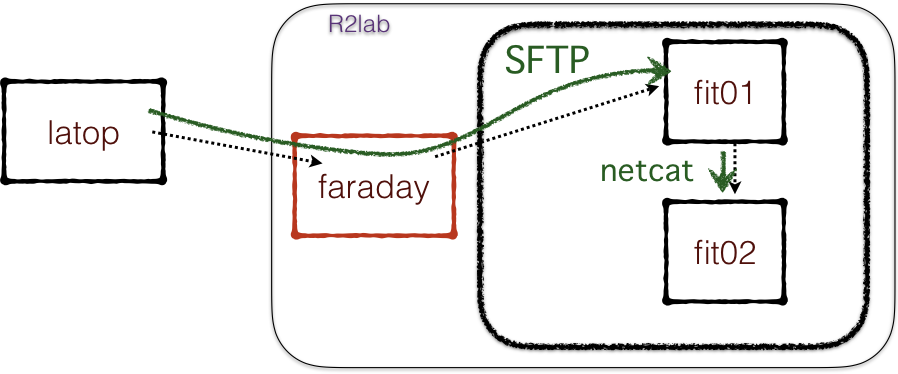
The version in C3 will perform the following:
generate a random file locally, and transfer it using SFTP onto fit01
transfer it from fit01 to fit02 over the data network using netcat
finally retrieve it locally from fit02 using SFTP again, and compare the result to make sure the file is intact.
The progression from C1 to C3 matches these bullets : C1 just performs the first bullet, and C2 performs the first two bullets.
The last scenario, labelled C3bis, is a variant around C2. It is not crucial to see it when first reading this tutorial. In this scenario, we perform the exact same scenario as in C2, but we see a recipe to start and stop a process in sync with the jobs in a scheduler.
New features
We will meet the LocalNode object that will let use run local
commands just like on remote nodes.
We will also take this chance to see that a SshJob object can be
defined with several commands, which can be helpful to avoid the
need to create long strings of jobs.
We also introduce the Sequence object, that is a convenience tool
for creating, well obviously, sequences of jobs, without the hassle of
managing the required relationship for each job.
Finally throughtout this series, we will also illustrate another possible way to manage the components of the scheduler: instead of creating the scheduler at the end with all the jobs, we create the scheduler at the very beginning and create the jobs right into the scheduler. Of course the result is exactly the same, it’s just another programming style that is probably worth considering.
Let us start with copying files over to the
node (tab C1) with the Push command object.
C1: Objective
We start over from scratch here, and to begin with, we want to
locally generate a random file,
and push it over to node fit01

The C1 scenario
This is what the code below carries out; the things to outline in this code are
we see for the first time the
LocalNodeobject, that can be used almost exactly as aSshNodeobject - except that it is of course simpler to build;once the local file is created, we use a
Pushinstance instead of theRunand its variants that we have seen so far, to actually copy local files on the remote node;also note that inside a single
SshJobinstance, it is possible to provide an (ordered) list of commands to run on that node, mixing commands and file transfers as needed; this is how we can both push theRANDOMfile over to node1, and display its size and SHA1 sum, using a single instance ofSshJob.
C1: The code
#!/usr/bin/env python3

import sys, os

import asyncio

from argparse import ArgumentParser

from asynciojobs import Scheduler

from apssh import SshNode, SshJob, LocalNode
from apssh import Run, RunString, Push

##########

gateway_hostname  = 'faraday.inria.fr'
gateway_username  = 'r2lab-tutorial'
verbose_ssh = False
random_size = 2**10

# this time we want to be able to specify username and verbose_ssh
parser = ArgumentParser()
parser.add_argument("-s", "--slice", default=gateway_username,
                    help="specify an alternate slicename, default={}"
                         .format(gateway_username))
parser.add_argument("-v", "--verbose-ssh", default=False, action='store_true',
                    help="run ssh in verbose mode")
args = parser.parse_args()

# override globals from the command line
gateway_username = args.slice
verbose_ssh = args.verbose_ssh

########## the nodes involved

faraday = SshNode(hostname = gateway_hostname, username = gateway_username,
                  verbose = verbose_ssh)

# saying gateway = faraday means to tunnel ssh through the gateway
node1 = SshNode(gateway = faraday, hostname = "fit01", username = "root",
                verbose = verbose_ssh)

########## create the scheduler instance upfront
scheduler = Scheduler()

check_lease = SshJob(
    node = faraday,
    critical = True,
    command = Run("rhubarbe leases --check"),
    scheduler = scheduler,
)

########## 1 step, generate a random data file of 1 M bytes

create_random_job = SshJob(
    # Using LocalNode() means this will run on our laptop
    node = LocalNode(),
    commands = [
        Run("head", "-c", random_size, "<", "/dev/random", ">", "RANDOM"),
        Run("ls", "-l", "RANDOM"),
        Run("shasum", "RANDOM"),
        ],
    required = check_lease,
    scheduler = scheduler,
)

########## 2nd step : push this over to node1

push_job = SshJob(
    node = node1,
    commands = [
        Push( localpaths = [ "RANDOM" ],
              remotepath = "."),
        Run("ls -l RANDOM"),
        Run("sha1sum RANDOM"),
    ],
    required = create_random_job,
    scheduler = scheduler,
)

##########
# run the scheduler
ok = scheduler.orchestrate()

# give details if it failed
ok or scheduler.debrief()

# producing a dot file for illustration
scheduler.export_as_dotfile("C1.dot")

# return something useful to your OS
exit(0 if ok else 1)
C1-files.py
C1: Sample output
Sample output: $ python3 C1-files.py
faraday.inria.fr:Checking current reservation for r2lab-tutorial : OK
LOCALNODE:-rw-r--r--  1 tparment  staff  1024 May 12 11:01 RANDOM
LOCALNODE:255e13ecab298831d82e4edba1bc654f4d634b4d  RANDOM
fit01:-rw-r--r-- 1 root root 1024 May 12 11:01 RANDOM
fit01:255e13ecab298831d82e4edba1bc654f4d634b4d  RANDOM
C1: Next
In the next section (tab C2) we will extend this scenario, and push the RANDOM file on another node using the wired network.
C2: Objective
We extend the C1 scenario and push the RANDOM file from fit01 to fit02 over the wired network.
The C2 scenario
So we reuse the turn-on-data commands, that we had seen in the B
series already, to enable the data interface.
File transfer per se
In order to transfer the file from fit01 to fit02: of course we could
have used simple tools like plain scp. Our goal however here is more
to show how to orchestrate such transfers in an environment closer to
typical experimental conditions.
So in this first variant, we will use netcat; we start with running
a server instance of netcat on the receiving end (in our case
fit02), then run a client netcat on the sender side (here fit01).
In terms of synchronization, note how we
start the server side in background (with a
&); the corresponding job hence returns immediately;which lets us start the client side almost immediately afterwards (well, we add a 1s delay to stay on the safe side)
and luckily enough, the server-side server will terminate as soon as the client side netcat is done; so we essentially do not need to worry about stopping the server, it stops itself at the exact right time
so once the sender client is done, we can proceed and display the received file on fit02.
The purpose of the C3bis script is to show how one can use shell tricks to deal with less fortunate situations, where typically the server side runs forever, but you need to stop it once some other job is done.
The Sequence object
Note the use of the Sequence object in variable transfer_job, that
almost entirely relieves us of managing the required relationships.
All the jobs inserted in the Sequence have their required
relationship set to the previous job in the list, by setting
required on the Sequence object we actually deal with the
required jobs for the first job in the sequence.
Finally, by setting scheduler on this transfer_job object, we
automatically attach all the jobs in the sequence to the global
scheduler.
C2: The code
#!/usr/bin/env python3

import sys, os

import asyncio

from argparse import ArgumentParser

from asynciojobs import Scheduler, Sequence

from apssh import SshNode, SshJob, LocalNode
from apssh import Run, RunString, Push

##########

gateway_hostname  = 'faraday.inria.fr'
gateway_username  = 'r2lab-tutorial'
verbose_ssh = False
random_size = 2**10
netcat_port = 10000

# this time we want to be able to specify username and verbose_ssh
parser = ArgumentParser()
parser.add_argument("-s", "--slice", default=gateway_username,
                    help="specify an alternate slicename, default={}"
                         .format(gateway_username))
parser.add_argument("-v", "--verbose-ssh", default=False, action='store_true',
                    help="run ssh in verbose mode")
args = parser.parse_args()

gateway_username = args.slice
verbose_ssh = args.verbose_ssh

########## the nodes involved

faraday = SshNode(hostname = gateway_hostname, username = gateway_username,
                  verbose = verbose_ssh)

# saying gateway = faraday means to tunnel ssh through the gateway
node1 = SshNode(gateway = faraday, hostname = "fit01", username = "root",
                verbose = verbose_ssh)
node2 = SshNode(gateway = faraday, hostname = "fit02", username = "root",
                verbose = verbose_ssh)

# for convenience, a collection of the nodes
# that we need to initialize
nodes = (node1, node2)

########## create the scheduler instance upfront
scheduler = Scheduler()

check_lease = SshJob(
    node = faraday,
    critical = True,
    command = Run("rhubarbe leases --check"),
    scheduler = scheduler,
)

########## 1 step, generate a random data file of 1 M bytes

create_random_job = SshJob(
    node = LocalNode(),
    commands = [
        Run("head", "-c", random_size, "<", "/dev/random", ">", "RANDOM"),
        Run("ls", "-l", "RANDOM"),
        Run("shasum", "RANDOM"),
        ],
    required = check_lease,
    scheduler = scheduler,
)

########## 2nd step : push this over to node1

push_job = SshJob(
    node = node1,
    commands = [
        Push( localpaths = [ "RANDOM" ],
              remotepath = "."),
        Run("ls -l RANDOM"),
        Run("sha1sum RANDOM"),
    ],
    required = create_random_job,
    scheduler = scheduler,
)

########## step 3 : turn on data interfaces
# a convenient way to create many jobs in a single pass is
# to build a list of jobs using a python comprehension

turn_on_datas = [
    SshJob( node = node,
            command = Run("turn-on-data"),
            required = push_job,
            scheduler = scheduler,
    ) for node in nodes ]

########## next : run a sender on node1 and a receiver on node 2
# in order to transfer RANDOM over a netcat session on the data network

# a Sequence object is a container for jobs, they will have their
# 'required' relationship organized along the sequence order

transfer_job = Sequence(

    # start the receiver - this of course returns immediately
    SshJob(
        node = node2,
        commands = [
            Run("netcat", "-l", netcat_port, ">", "RANDOM", "&"),
        ],
    ),

    # start the sender
    SshJob(
        node = node1,
        # ignore netcat result
        critical = False,
        commands = [
            # let the server warm up just in case
            Run("sleep 1"),
            Run("netcat", "-N", "data02", netcat_port, "<", "RANDOM"),
            Run("echo SENDER DONE"),
        ],
    ),

    # check contents on the receiving end
    SshJob(
        node=node2,
        commands = [
            Run("ls -l RANDOM"),
            Run("sha1sum RANDOM"),
        ],
    ),

    ### these two apply to the Sequence
    # required applies to the first job in the sequence
    required = turn_on_datas,
    # scheduler applies to all jobs in the sequence
    scheduler = scheduler,
)

##########
# run the scheduler
ok = scheduler.orchestrate()

# give details if it failed
ok or scheduler.debrief()

# producing a dot file for illustration
scheduler.export_as_dotfile("C2.dot")

# return something useful to your OS
exit(0 if ok else 1)
C2-files.py
 #!/usr/bin/env python3

 import sys, os

 import asyncio

 from argparse import ArgumentParser

-from asynciojobs import Scheduler
+from asynciojobs import Scheduler, Sequence

 from apssh import SshNode, SshJob, LocalNode
 from apssh import Run, RunString, Push

 ##########

 gateway_hostname  = 'faraday.inria.fr'
 gateway_username  = 'r2lab-tutorial'
 verbose_ssh = False
 random_size = 2**10
+netcat_port = 10000

 # this time we want to be able to specify username and verbose_ssh
 parser = ArgumentParser()
 parser.add_argument("-s", "--slice", default=gateway_username,
                     help="specify an alternate slicename, default={}"
                          .format(gateway_username))
 parser.add_argument("-v", "--verbose-ssh", default=False, action='store_true',
                     help="run ssh in verbose mode")
 args = parser.parse_args()

-# override globals from the command line
 gateway_username = args.slice
 verbose_ssh = args.verbose_ssh

 ########## the nodes involved

 faraday = SshNode(hostname = gateway_hostname, username = gateway_username,
                   verbose = verbose_ssh)

 # saying gateway = faraday means to tunnel ssh through the gateway
 node1 = SshNode(gateway = faraday, hostname = "fit01", username = "root",
                 verbose = verbose_ssh)
+node2 = SshNode(gateway = faraday, hostname = "fit02", username = "root",
+                verbose = verbose_ssh)
+
+# for convenience, a collection of the nodes
+# that we need to initialize
+nodes = (node1, node2)

 ########## create the scheduler instance upfront
 scheduler = Scheduler()

 check_lease = SshJob(
     node = faraday,
     critical = True,
     command = Run("rhubarbe leases --check"),
     scheduler = scheduler,
 )

 ########## 1 step, generate a random data file of 1 M bytes

 create_random_job = SshJob(
-    # Using LocalNode() means this will run on our laptop
     node = LocalNode(),
     commands = [
         Run("head", "-c", random_size, "<", "/dev/random", ">", "RANDOM"),
         Run("ls", "-l", "RANDOM"),
         Run("shasum", "RANDOM"),
         ],
     required = check_lease,
     scheduler = scheduler,
 )

 ########## 2nd step : push this over to node1

 push_job = SshJob(
     node = node1,
     commands = [
         Push( localpaths = [ "RANDOM" ],
               remotepath = "."),
         Run("ls -l RANDOM"),
         Run("sha1sum RANDOM"),
     ],
     required = create_random_job,
     scheduler = scheduler,
 )

+########## step 3 : turn on data interfaces
+# a convenient way to create many jobs in a single pass is
+# to build a list of jobs using a python comprehension
+
+turn_on_datas = [
+    SshJob( node = node,
+            command = Run("turn-on-data"),
+            required = push_job,
+            scheduler = scheduler,
+    ) for node in nodes ]
+
+########## next : run a sender on node1 and a receiver on node 2
+# in order to transfer RANDOM over a netcat session on the data network
+
+# a Sequence object is a container for jobs, they will have their
+# 'required' relationship organized along the sequence order
+
+transfer_job = Sequence(
+
+    # start the receiver - this of course returns immediately
+    SshJob(
+        node = node2,
+        commands = [
+            Run("netcat", "-l", netcat_port, ">", "RANDOM", "&"),
+        ],
+    ),
+
+    # start the sender
+    SshJob(
+        node = node1,
+        # ignore netcat result
+        critical = False,
+        commands = [
+            # let the server warm up just in case
+            Run("sleep 1"),
+            Run("netcat", "-N", "data02", netcat_port, "<", "RANDOM"),
+            Run("echo SENDER DONE"),
+        ],
+    ),
+
+    # check contents on the receiving end
+    SshJob(
+        node=node2,
+        commands = [
+            Run("ls -l RANDOM"),
+            Run("sha1sum RANDOM"),
+        ],
+    ),
+
+    ### these two apply to the Sequence
+    # required applies to the first job in the sequence
+    required = turn_on_datas,
+    # scheduler applies to all jobs in the sequence
+    scheduler = scheduler,
+)
+
 ##########
 # run the scheduler
 ok = scheduler.orchestrate()

 # give details if it failed
 ok or scheduler.debrief()

 # producing a dot file for illustration
-scheduler.export_as_dotfile("C1.dot")
+scheduler.export_as_dotfile("C2.dot")

 # return something useful to your OS
 exit(0 if ok else 1)
Changes from C1-files.py to C2-files.py
C2: Sample output
Sample output: $ python3 C2-files.py
faraday.inria.fr:Checking current reservation for r2lab-tutorial : OK
LOCALNODE:-rw-r--r--  1 tparment  staff  1024 May 12 11:01 RANDOM
LOCALNODE:ffb614df2dc006d4bd568bc6e0efa8454e72a04a  RANDOM
fit01:-rw-r--r-- 1 root root 1024 May 12 11:02 RANDOM
fit01:ffb614df2dc006d4bd568bc6e0efa8454e72a04a  RANDOM
fit01:data
fit02:data
fit01:SENDER DONE
fit02:-rw-r--r-- 1 root root 1024 May 12 11:02 RANDOM
fit02:ffb614df2dc006d4bd568bc6e0efa8454e72a04a  RANDOM
C2: Next
In the next section (tab C3) we will see how to retrieve back that same file in order to close the loop.
C3: Objective
In this scenario, we extend again C2 to close the loop, and retrieve our random file back on the local laptop.

The C3 scenario
The Pull object
The only new thing here is the use of a Pull object, which like for
the Push object, can be used in a list of commands to run on a given
node as part of a SshJob.
C3: The code
#!/usr/bin/env python3

import sys, os

import asyncio

from argparse import ArgumentParser

from asynciojobs import Scheduler, Sequence

from apssh import SshNode, SshJob, LocalNode
from apssh import Run, RunString, Push, Pull

##########

gateway_hostname  = 'faraday.inria.fr'
gateway_username  = 'r2lab-tutorial'
verbose_ssh = False
random_size = 2**10
netcat_port = 10000

# this time we want to be able to specify username and verbose_ssh
parser = ArgumentParser()
parser.add_argument("-s", "--slice", default=gateway_username,
                    help="specify an alternate slicename, default={}"
                         .format(gateway_username))
parser.add_argument("-v", "--verbose-ssh", default=False, action='store_true',
                    help="run ssh in verbose mode")
args = parser.parse_args()

gateway_username = args.slice
verbose_ssh = args.verbose_ssh

########## the nodes involved

faraday = SshNode(hostname = gateway_hostname, username = gateway_username,
                  verbose = verbose_ssh)

# saying gateway = faraday means to tunnel ssh through the gateway
node1 = SshNode(gateway = faraday, hostname = "fit01", username = "root",
                verbose = verbose_ssh)
node2 = SshNode(gateway = faraday, hostname = "fit02", username = "root",
                verbose = verbose_ssh)

nodes = (node1, node2)

########## create the scheduler instance upfront
scheduler = Scheduler()

check_lease = SshJob(
    node = faraday,
    critical = True,
    command = Run("rhubarbe leases --check"),
    scheduler = scheduler,
)

########## 1 step, generate a random data file of 1 M bytes

create_random_job = SshJob(
    node = LocalNode(),
    commands = [
        Run("head", "-c", random_size, "<", "/dev/random", ">", "RANDOM"),
        Run("ls", "-l", "RANDOM"),
        Run("shasum", "RANDOM"),
        ],
    required = check_lease,
    scheduler = scheduler,
)

########## 2nd step : push this over to node1

push_job = SshJob(
    node = node1,
    commands = [
        Push( localpaths = [ "RANDOM" ],
              remotepath = "."),
        Run("ls -l RANDOM"),
        Run("sha1sum RANDOM"),
    ],
    required = create_random_job,
    scheduler = scheduler,
)

########## step 3 : turn on data interfaces
# a convenient way to create many jobs in a single pass is
# to build a list of jobs using a python comprehension

turn_on_datas = [
    SshJob( node = node,
            command = Run("turn-on-data"),
            required = push_job,
            scheduler = scheduler,
    ) for node in nodes ]

########## next : run a sender on node1 and a receiver on node 2
# in order to transfer RANDOM over a netcat session on the data network

# a Sequence object is a container for jobs, they will have their
# 'required' relationship organized along the sequence order

transfer_job = Sequence(

    # start the receiver - this of course returns immediately
    SshJob(
        node = node2,
        commands = [
            Run("netcat", "-l", "data02", netcat_port, ">", "RANDOM", "&"),
        ],
    ),

    # start the sender
    SshJob(
        node = node1,
        # ignore netcat result
        critical = False,
        commands = [
            # let the server warm up just in case
            Run("sleep 1"),
            Run("netcat", "data02", netcat_port, "<", "RANDOM"),
            Run("echo SENDER DONE"),
        ],
    ),

    # check contents on the receiving end
    SshJob(
        node=node2,
        commands = [
            Run("ls -l RANDOM"),
            Run("sha1sum RANDOM"),
        ],
    ),

    ### these two apply to the Sequence
    # required applies to the first job in the sequence
    required = turn_on_datas,
    # scheduler applies to all jobs in the sequence
    scheduler = scheduler,
)

########## finally : let's complete the loop and
########## retrieve RANDOM from node2 back on local laptop

Sequence(
    SshJob( node = node2,
            commands = [
                Run("echo the Pull command runs on $(hostname)"),
                Pull(remotepaths = "RANDOM",
                     localpath = "RANDOM.loopback"),
            ]),
    # make sure the file we receive at the end of the loop
    # is identical to the original
    SshJob( node = LocalNode(),
            commands = [
                Run("ls -l RANDOM.loopback", verbose=True),
                # this is a python trick to concatenate 2 strings
                Run("diff RANDOM RANDOM.loopback "
                    "&& echo RANDOM.loopback identical to RANDOM"),
            ]),
    scheduler = scheduler,
    required = transfer_job
)

##########
# run the scheduler
ok = scheduler.orchestrate()

# give details if it failed
ok or scheduler.debrief()

# producing a dot file for illustration
scheduler.export_as_dotfile("C3.dot")

# return something useful to your OS
exit(0 if ok else 1)
C3-files.py
 #!/usr/bin/env python3

 import sys, os

 import asyncio

 from argparse import ArgumentParser

 from asynciojobs import Scheduler, Sequence

 from apssh import SshNode, SshJob, LocalNode
-from apssh import Run, RunString, Push
+from apssh import Run, RunString, Push, Pull

 ##########

 gateway_hostname  = 'faraday.inria.fr'
 gateway_username  = 'r2lab-tutorial'
 verbose_ssh = False
 random_size = 2**10
 netcat_port = 10000

 # this time we want to be able to specify username and verbose_ssh
 parser = ArgumentParser()
 parser.add_argument("-s", "--slice", default=gateway_username,
                     help="specify an alternate slicename, default={}"
                          .format(gateway_username))
 parser.add_argument("-v", "--verbose-ssh", default=False, action='store_true',
                     help="run ssh in verbose mode")
 args = parser.parse_args()

 gateway_username = args.slice
 verbose_ssh = args.verbose_ssh

 ########## the nodes involved

 faraday = SshNode(hostname = gateway_hostname, username = gateway_username,
                   verbose = verbose_ssh)

 # saying gateway = faraday means to tunnel ssh through the gateway
 node1 = SshNode(gateway = faraday, hostname = "fit01", username = "root",
                 verbose = verbose_ssh)
 node2 = SshNode(gateway = faraday, hostname = "fit02", username = "root",
                 verbose = verbose_ssh)

-# for convenience, a collection of the nodes
-# that we need to initialize
 nodes = (node1, node2)

 ########## create the scheduler instance upfront
 scheduler = Scheduler()

 check_lease = SshJob(
     node = faraday,
     critical = True,
     command = Run("rhubarbe leases --check"),
     scheduler = scheduler,
 )

 ########## 1 step, generate a random data file of 1 M bytes

 create_random_job = SshJob(
     node = LocalNode(),
     commands = [
         Run("head", "-c", random_size, "<", "/dev/random", ">", "RANDOM"),
         Run("ls", "-l", "RANDOM"),
         Run("shasum", "RANDOM"),
         ],
     required = check_lease,
     scheduler = scheduler,
 )

 ########## 2nd step : push this over to node1

 push_job = SshJob(
     node = node1,
     commands = [
         Push( localpaths = [ "RANDOM" ],
               remotepath = "."),
         Run("ls -l RANDOM"),
         Run("sha1sum RANDOM"),
     ],
     required = create_random_job,
     scheduler = scheduler,
 )

 ########## step 3 : turn on data interfaces
 # a convenient way to create many jobs in a single pass is
 # to build a list of jobs using a python comprehension

 turn_on_datas = [
     SshJob( node = node,
             command = Run("turn-on-data"),
             required = push_job,
             scheduler = scheduler,
     ) for node in nodes ]

 ########## next : run a sender on node1 and a receiver on node 2
 # in order to transfer RANDOM over a netcat session on the data network

 # a Sequence object is a container for jobs, they will have their
 # 'required' relationship organized along the sequence order

 transfer_job = Sequence(

     # start the receiver - this of course returns immediately
     SshJob(
         node = node2,
         commands = [
-            Run("netcat", "-l", netcat_port, ">", "RANDOM", "&"),
+            Run("netcat", "-l", "data02", netcat_port, ">", "RANDOM", "&"),
         ],
     ),

     # start the sender
     SshJob(
         node = node1,
         # ignore netcat result
         critical = False,
         commands = [
             # let the server warm up just in case
             Run("sleep 1"),
-            Run("netcat", "-N", "data02", netcat_port, "<", "RANDOM"),
+            Run("netcat", "data02", netcat_port, "<", "RANDOM"),
             Run("echo SENDER DONE"),
         ],
     ),

     # check contents on the receiving end
     SshJob(
         node=node2,
         commands = [
             Run("ls -l RANDOM"),
             Run("sha1sum RANDOM"),
         ],
     ),

     ### these two apply to the Sequence
     # required applies to the first job in the sequence
     required = turn_on_datas,
     # scheduler applies to all jobs in the sequence
     scheduler = scheduler,
 )

+########## finally : let's complete the loop and
+########## retrieve RANDOM from node2 back on local laptop
+
+Sequence(
+    SshJob( node = node2,
+            commands = [
+                Run("echo the Pull command runs on $(hostname)"),
+                Pull(remotepaths = "RANDOM",
+                     localpath = "RANDOM.loopback"),
+            ]),
+    # make sure the file we receive at the end of the loop
+    # is identical to the original
+    SshJob( node = LocalNode(),
+            commands = [
+                Run("ls -l RANDOM.loopback", verbose=True),
+                # this is a python trick to concatenate 2 strings
+                Run("diff RANDOM RANDOM.loopback "
+                    "&& echo RANDOM.loopback identical to RANDOM"),
+            ]),
+    scheduler = scheduler,
+    required = transfer_job
+)
+
 ##########
 # run the scheduler
 ok = scheduler.orchestrate()

 # give details if it failed
 ok or scheduler.debrief()

 # producing a dot file for illustration
-scheduler.export_as_dotfile("C2.dot")
+scheduler.export_as_dotfile("C3.dot")

 # return something useful to your OS
 exit(0 if ok else 1)
Changes from C2-files.py to C3-files.py
C3: Sample output
Sample output: $ python3 C3-files.py
LOCALNODE:Run: -> ls -l RANDOM.loopback
LOCALNODE:Run: 0 <- ls -l RANDOM.loopback
faraday.inria.fr:Checking current reservation for r2lab-tutorial : OK
LOCALNODE:-rw-r--r--  1 tparment  staff  1024 May 12 11:02 RANDOM
LOCALNODE:00b15964267b11eb8df3e3bd3addb50512b9e81d  RANDOM
fit01:-rw-r--r-- 1 root root 1024 May 12 11:02 RANDOM
fit01:00b15964267b11eb8df3e3bd3addb50512b9e81d  RANDOM
fit01:data
fit02:data
fit01:SENDER DONE
fit02:-rw-r--r-- 1 root root 1024 May 12 11:02 RANDOM
fit02:00b15964267b11eb8df3e3bd3addb50512b9e81d  RANDOM
fit02:the Pull command runs on fit02
LOCALNODE:-rw-r--r--  1 tparment  staff  1024 May 12 11:02 RANDOM.loopback
LOCALNODE:RANDOM.loopback identical to RANDOM
C3: Next
If this is your first reading, we suggest you skip C3bis (tab C3bis) and go directly to WRAPUP (tab WRAP UP) for a conclusion on this series.
C3bis: Objective
In this particular scenario, we restart from C2.
Remember C2 is about transferring a file from node 1 to node 2 over
the data network, thanks to netcat. As we had seen at the time, it
is rather fortunate that netcat in server mode returns as soon as
its (single) client terminates.
There are a lot of cases though, where things are not that simple, and where there is a need to manually terminate / cleanup dangling processes that are no longer useful.
Sometimes, it is only a matter of starting and stopping packaged
services like apache or similar, and in this case all we need to do is
to call things like e.g. systemctl start apache2 and systemctl stop apache2.
In the code below, we will see a technique that can be used to start
and stop, and even monitor, a custom process. This is in
receiver_manager_script, a small shell script that knows how to
start, stop, and even monitor, a single-process service.
C3bis: The code
Below you can see the difference with C2-files.py; the plain code for C3bis-files.py is in the dropdown.

The C3bis scenario
#!/usr/bin/env python3

import sys, os

import asyncio

from argparse import ArgumentParser

from asynciojobs import Scheduler, Sequence

from apssh import SshNode, SshJob, LocalNode
from apssh import Run, RunString, Push

##########

gateway_hostname  = 'faraday.inria.fr'
gateway_username  = 'r2lab-tutorial'
verbose_ssh = False
random_size = 2**10
netcat_port = 10000

# this time we want to be able to specify username and verbose_ssh
parser = ArgumentParser()
parser.add_argument("-s", "--slice", default=gateway_username,
                    help="specify an alternate slicename, default={}"
                         .format(gateway_username))
parser.add_argument("-v", "--verbose-ssh", default=False, action='store_true',
                    help="run ssh in verbose mode")
args = parser.parse_args()

gateway_username = args.slice
verbose_ssh = args.verbose_ssh

########## the nodes involved

faraday = SshNode(hostname = gateway_hostname, username = gateway_username,
                  verbose = verbose_ssh)

# saying gateway = faraday means to tunnel ssh through the gateway
node1 = SshNode(gateway = faraday, hostname = "fit01", username = "root",
                verbose = verbose_ssh)
node2 = SshNode(gateway = faraday, hostname = "fit02", username = "root",
                verbose = verbose_ssh)

nodes = (node1, node2)

########## create the scheduler instance upfront
scheduler = Scheduler()

check_lease = SshJob(
    node = faraday,
    critical = True,
    command = Run("rhubarbe leases --check"),
    scheduler = scheduler,
)

#################### utility script to manage a receiver
# in order to transfer RANDOM over a netcat session on the data network
#
receiver_manager_script = """#!/bin/bash
source /etc/profile.d/nodes.sh

function start() {
    port=$1; shift
    outfile=$1; shift
    # r2lab-id returns a 2-digit string with the node number
    ipaddr="data"$(r2lab-id)
    echo "STARTING CAPTURE into $outfile"
    # start netcat in listen mode
    netcat -l $ipaddr $port > $outfile &
    # bash's special $! returns pid of the last job sent in background
    # preserve this pid in local file
    echo $! > netcat.pid
    echo netcat server running on $ipaddr:$port in pid $!
}

function stop() {
    echo "STARTING CAPTURE into $outfile"
    pid=$(cat netcat.pid)
    # not necessary as netcat dies on its own when clent terminates
    echo Would kill process $pid
    rm netcat.pid
}

function monitor () {
    while true; do
        pid=$(pgrep netcat)
        [ -n "$pid" ] && ps $pid || echo no netcat process
# thanks to Ubuntu the shell's sleep can do fractions of seconds
        sleep .2
    done
}
# usual generic laucher
"$@"
"""

########## 1 step, generate a random data file of 1 M bytes

create_random_job = SshJob(
    node = LocalNode(),
    commands = [
        Run("head", "-c", random_size, "<", "/dev/random", ">", "RANDOM"),
        Run("ls", "-l", "RANDOM"),
        Run("shasum", "RANDOM"),
        ],
    required = check_lease,
    scheduler = scheduler,
)

########## 2nd step : push this over to node1

push_job = SshJob(
    node = node1,
    commands = [
        Push( localpaths = [ "RANDOM" ],
              remotepath = "."),
        Run("ls -l RANDOM"),
        Run("sha1sum RANDOM"),
    ],
    required = create_random_job,
    scheduler = scheduler,
)

########## step 3 : turn on data interfaces
# a convenient way to create many jobs in a single pass is
# to build a list of jobs using a python comprehension

turn_on_datas = [
    SshJob( node = node,
            command = Run("turn-on-data"),
            required = push_job,
            scheduler = scheduler,
    ) for node in nodes ]

########## next : run a sender on node1 and a receiver on node 2
# start the receiver - this of course returns immediately
SshJob(
    node = node2,
    commands = [
        RunString(receiver_manager_script, "start", netcat_port, "RANDOM",
                  remote_name = "receiver-manager"),
    ],
    required = turn_on_datas,
    scheduler = scheduler,
)

transfer_job = Sequence(

    # start the sender
    SshJob(
        node = node1,
        # ignore netcat result
        critical = False,
        commands = [
            # let the server warm up just in case
            Run("sleep 1"),
            Run("netcat", "data02", netcat_port, "<", "RANDOM"),
            Run("echo SENDER DONE"),
        ]),

    # kill the receiver, and
    # check contents on the receiving end
    SshJob(
        node=node2,
        # set a label for the various representations
        # including the graphical one obtained with export_as_dotfile
        label = "stop receiver",
        commands = [
            RunString(receiver_manager_script, "stop",
                      remote_name="receiver-manager"),
            Run("ls -l RANDOM"),
            Run("sha1sum RANDOM"),
        ]),
    required = turn_on_datas,
    scheduler = scheduler,
)

SshJob(
    node = node2,
    # this job won't finish on its own
    forever = True,
    # see above
    label = "infinite monitor",
    commands = [
        RunString(receiver_manager_script, "monitor",
                  remote_name="receiver-manager"),
    ],
    scheduler = scheduler,
)

##########
# run the scheduler
ok = scheduler.orchestrate()

# give details if it failed
ok or scheduler.debrief()

# producing a dot file for illustration
scheduler.export_as_dotfile("C3bis.dot")

# return something useful to your OS
exit(0 if ok else 1)
C3bis-files.py
 #!/usr/bin/env python3

 import sys, os

 import asyncio

 from argparse import ArgumentParser

 from asynciojobs import Scheduler, Sequence

 from apssh import SshNode, SshJob, LocalNode
 from apssh import Run, RunString, Push

 ##########

 gateway_hostname  = 'faraday.inria.fr'
 gateway_username  = 'r2lab-tutorial'
 verbose_ssh = False
 random_size = 2**10
 netcat_port = 10000

 # this time we want to be able to specify username and verbose_ssh
 parser = ArgumentParser()
 parser.add_argument("-s", "--slice", default=gateway_username,
                     help="specify an alternate slicename, default={}"
                          .format(gateway_username))
 parser.add_argument("-v", "--verbose-ssh", default=False, action='store_true',
                     help="run ssh in verbose mode")
 args = parser.parse_args()

 gateway_username = args.slice
 verbose_ssh = args.verbose_ssh

 ########## the nodes involved

 faraday = SshNode(hostname = gateway_hostname, username = gateway_username,
                   verbose = verbose_ssh)

 # saying gateway = faraday means to tunnel ssh through the gateway
 node1 = SshNode(gateway = faraday, hostname = "fit01", username = "root",
                 verbose = verbose_ssh)
 node2 = SshNode(gateway = faraday, hostname = "fit02", username = "root",
                 verbose = verbose_ssh)

-# for convenience, a collection of the nodes
-# that we need to initialize
 nodes = (node1, node2)

 ########## create the scheduler instance upfront
 scheduler = Scheduler()

 check_lease = SshJob(
     node = faraday,
     critical = True,
     command = Run("rhubarbe leases --check"),
     scheduler = scheduler,
 )
+
+#################### utility script to manage a receiver
+# in order to transfer RANDOM over a netcat session on the data network
+#
+receiver_manager_script = """#!/bin/bash
+source /etc/profile.d/nodes.sh
+
+function start() {
+    port=$1; shift
+    outfile=$1; shift
+    # r2lab-id returns a 2-digit string with the node number
+    ipaddr="data"$(r2lab-id)
+    echo "STARTING CAPTURE into $outfile"
+    # start netcat in listen mode
+    netcat -l $ipaddr $port > $outfile &
+    # bash's special $! returns pid of the last job sent in background
+    # preserve this pid in local file
+    echo $! > netcat.pid
+    echo netcat server running on $ipaddr:$port in pid $!
+}
+
+function stop() {
+    echo "STARTING CAPTURE into $outfile"
+    pid=$(cat netcat.pid)
+    # not necessary as netcat dies on its own when clent terminates
+    echo Would kill process $pid
+    rm netcat.pid
+}
+
+function monitor () {
+    while true; do
+        pid=$(pgrep netcat)
+        [ -n "$pid" ] && ps $pid || echo no netcat process
+# thanks to Ubuntu the shell's sleep can do fractions of seconds
+        sleep .2
+    done
+}
+# usual generic laucher
+"$@"
+"""

 ########## 1 step, generate a random data file of 1 M bytes

 create_random_job = SshJob(
     node = LocalNode(),
     commands = [
         Run("head", "-c", random_size, "<", "/dev/random", ">", "RANDOM"),
         Run("ls", "-l", "RANDOM"),
         Run("shasum", "RANDOM"),
         ],
     required = check_lease,
     scheduler = scheduler,
 )

 ########## 2nd step : push this over to node1

 push_job = SshJob(
     node = node1,
     commands = [
         Push( localpaths = [ "RANDOM" ],
               remotepath = "."),
         Run("ls -l RANDOM"),
         Run("sha1sum RANDOM"),
     ],
     required = create_random_job,
     scheduler = scheduler,
 )

 ########## step 3 : turn on data interfaces
 # a convenient way to create many jobs in a single pass is
 # to build a list of jobs using a python comprehension

 turn_on_datas = [
     SshJob( node = node,
             command = Run("turn-on-data"),
             required = push_job,
             scheduler = scheduler,
     ) for node in nodes ]

 ########## next : run a sender on node1 and a receiver on node 2
-# in order to transfer RANDOM over a netcat session on the data network
-
-# a Sequence object is a container for jobs, they will have their
-# 'required' relationship organized along the sequence order
+# start the receiver - this of course returns immediately
+SshJob(
+    node = node2,
+    commands = [
+        RunString(receiver_manager_script, "start", netcat_port, "RANDOM",
+                  remote_name = "receiver-manager"),
+    ],
+    required = turn_on_datas,
+    scheduler = scheduler,
+)

 transfer_job = Sequence(
-
-    # start the receiver - this of course returns immediately
-    SshJob(
-        node = node2,
-        commands = [
-            Run("netcat", "-l", netcat_port, ">", "RANDOM", "&"),
-        ],
-    ),

     # start the sender
     SshJob(
         node = node1,
         # ignore netcat result
         critical = False,
         commands = [
             # let the server warm up just in case
             Run("sleep 1"),
-            Run("netcat", "-N", "data02", netcat_port, "<", "RANDOM"),
+            Run("netcat", "data02", netcat_port, "<", "RANDOM"),
             Run("echo SENDER DONE"),
-        ],
-    ),
-
+        ]),
+
+    # kill the receiver, and
     # check contents on the receiving end
     SshJob(
         node=node2,
+        # set a label for the various representations
+        # including the graphical one obtained with export_as_dotfile
+        label = "stop receiver",
         commands = [
+            RunString(receiver_manager_script, "stop",
+                      remote_name="receiver-manager"),
             Run("ls -l RANDOM"),
             Run("sha1sum RANDOM"),
-        ],
-    ),
-
-    ### these two apply to the Sequence
-    # required applies to the first job in the sequence
+        ]),
     required = turn_on_datas,
-    # scheduler applies to all jobs in the sequence
+    scheduler = scheduler,
+)
+
+SshJob(
+    node = node2,
+    # this job won't finish on its own
+    forever = True,
+    # see above
+    label = "infinite monitor",
+    commands = [
+        RunString(receiver_manager_script, "monitor",
+                  remote_name="receiver-manager"),
+    ],
     scheduler = scheduler,
 )

 ##########
 # run the scheduler
 ok = scheduler.orchestrate()

 # give details if it failed
 ok or scheduler.debrief()

 # producing a dot file for illustration
-scheduler.export_as_dotfile("C2.dot")
+scheduler.export_as_dotfile("C3bis.dot")

 # return something useful to your OS
 exit(0 if ok else 1)
Changes from C2-files.py to C3bis-files.py
C3bis: Sample output
Sample output: $ python3 C3bis-files.py
fit02:Using id=02 and fitid=fit02 - from hostname
faraday.inria.fr:Checking current reservation for r2lab-tutorial : OK
LOCALNODE:-rw-r--r--  1 tparment  staff  1024 May 12 11:02 RANDOM
LOCALNODE:d6eb748eb3230ff1e2ecf241f3fcf1be513c80b4  RANDOM
fit02:no netcat process
fit02:no netcat process
fit02:no netcat process
fit02:no netcat process
fit01:-rw-r--r-- 1 root root 1024 May 12 11:02 RANDOM
fit02:no netcat process
fit01:d6eb748eb3230ff1e2ecf241f3fcf1be513c80b4  RANDOM
fit02:no netcat process
fit01:data
fit02:data
fit02:no netcat process
fit02:no netcat process
fit02:no netcat process
fit02:no netcat process
fit02:STARTING CAPTURE into RANDOM
fit02:netcat server running on data02:10000 in pid 12675
fit02:  PID TTY      STAT   TIME COMMAND
fit02:12675 ?        S      0:00 netcat -l data02 10000
fit02:  PID TTY      STAT   TIME COMMAND
fit02:12675 ?        S      0:00 netcat -l data02 10000
fit02:  PID TTY      STAT   TIME COMMAND
fit02:12675 ?        S      0:00 netcat -l data02 10000
fit02:  PID TTY      STAT   TIME COMMAND
fit02:12675 ?        S      0:00 netcat -l data02 10000
fit02:  PID TTY      STAT   TIME COMMAND
fit02:12675 ?        S      0:00 netcat -l data02 10000
fit02:no netcat process
fit01:SENDER DONE
fit02:no netcat process
fit02:no netcat process
fit02:no netcat process
fit02:STARTING CAPTURE into
fit02:Would kill process 12675
fit02:no netcat process
fit02:-rw-r--r-- 1 root root 1024 May 12 11:02 RANDOM
fit02:no netcat process
fit02:d6eb748eb3230ff1e2ecf241f3fcf1be513c80b4  RANDOM
C3bis: Next
We can now conclude this section (tab WRAP UP)
In this C series , we have seen:
how to use the
PushandPullcommands to copy files back and forth on and from nodes;how to use the
LocalNodeto augment our scripts with commands run locally;how a single
SshJobcan trigger several commands, mixingRun,RunString,PushandPulltypes of commands;how to implement (in C3bis) a rustic service management feature, for housekeeping purposes;
and finally, still in C3bis, how to produce a graphical view of a
Schedulerfor documentation and/or troubleshooting.
In the next tutorial we will see how to simply provide a command-line option for loading images on nodes.